Home > Clients > Client Maintenance > Zip Codes
Zip Codes

When entering the zip code for a new client, the software will automatically fill in the city and state based on the zip code you enter. If it doesn't, just enter the city and state and they will be pulled in the next time you enter that zip code. See the Clients chapter for more information.

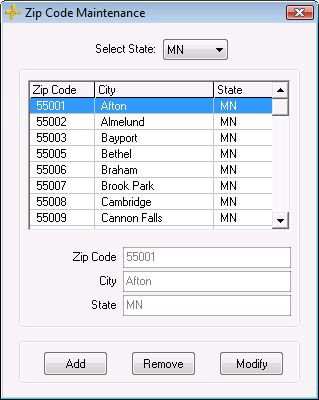
This feature is controlled by your list of zip codes. If you need to modify a zip code (city/state relationship and/or spelling), add a zip code, delete a zip code, or search for a zip code you can do that here in Zip Code Maintenance.

  1. Go to Maintenance > General (Studio) > Zip Codes.

  2. Click Add to add a new one, Remove to delete an existing listing, or Modify to make changes.

  3. Select a state from the drop-down list.

  4. Highlight the zip code that you want to remove or modify.


See also
Client Groups
Client Statuses
Client Status Reasons
Family Member Relationships
Lead Sources
Marketing Plans
Organizations
Phone Number Labels


Was this information helpful?YesNo

How would you rate this page?