

NOTE: This feature is available in the Professional and Enterprise versions of both Spectra and Stratus Desktop.
 |
ATTENTION!
This page refers to Triggers in Versions 2016 and prior. Click here to view the new Trigger 2017 feature. |
Use Session Type Triggers to have the software automatically create tasks or initiate a variety of communications based on the primary session date, or the date a session was created. These triggers can vary based on the type of session. For example, a wedding session may require a different type of response than a baby session. See also: Session Types
Setting up Session Type Triggers
-
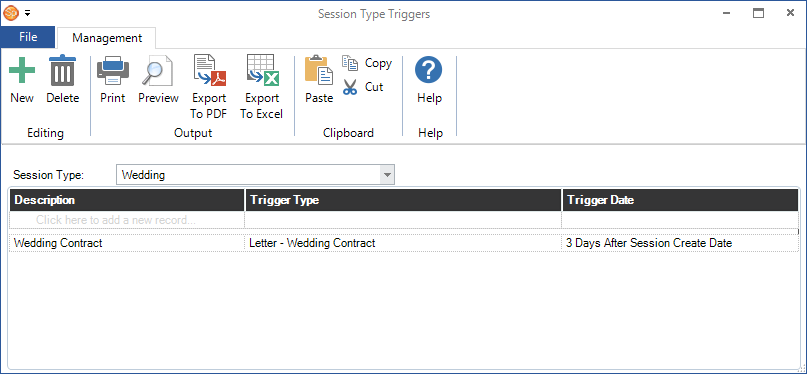
Go to Maintenance > Session > Session Type Triggers.
-
Select a session type from the drop-down list and then click New on the ribbon to create a new trigger for that session type.

-
Type in a Description for the trigger.
-
Select the Trigger Type from the drop-down list. The following choices are available:
-
Call - Create a call record for each session that meets the criteria at the time the trigger is processed.
-
Email - Send an email to each client who has a session that meets the criteria at the time the trigger is processed.
-
Letter - Generate a printed letter for each client who has a session that meets the criteria at the time the trigger is processed.
-
Email/Call - Send an email to each client who has a session that meets the criteria. If a client doesn't have an email address on file, a call record will be generated instead.
-
Email/Letter - Send an email to each client who has a session that meets the criteria. If a client doesn't have an email address on file, a printed letter will be generated instead.
-
SMS - Send an SMS text message to each client who has a session that meets the criteria at the time the trigger is processed.
-
SMS/Call - Send an SMS text message to each client who has a session that meets the criteria. If the client doesn't have an SMS-enabled phone number, a call record will be generated instead.
-
SMS/Email - Send an SMS text message to each client who has a session that meets the criteria. If the client doesn't have an SMS-enabled phone number, an email will be sent instead.
-
Task - Generate a task for each client who has a session that meets the criteria at the time the trigger is processed.
-
Web Form - (available in Stratus

 ) Create a web form for each client with a session that meets the criteria when the trigger is processed. See also: Web Forms
-
If you're using the Control Center to process triggers, the option to Automatically Process via Control Center allows you to choose whether or not a specific trigger should be processed automatically. When you create a new trigger, you may want to keep this box unchecked until you know the trigger is functioning as expected. You can also specify processing times to prevent the Control Center from sending emails and text messages in the middle of the night. See also: Control Center
-
Choose your Trigger Date option:
-
Session Create Date - With this option, the trigger is based on the date a session was created. Select On Session Create Date or enter a number of days after the date the session was created.
-
Primary Session Date - With this option, the trigger is based on the primary session date. Select On Session Date or enter the number of days before or after the primary session date.
-
Choose any of the following Trigger Exclusions:
-
Triggered Date is Past - With this option, the software will not try to run this trigger if the trigger date (the one you chose in step 6 above) is in the past. For example, if the trigger date is set to "On Status Due Date," it will try to process the session once the status reaches the due date. But if the trigger fails to run for whatever reason, once a session passes the status due date, it won’t be included anymore. This is important if you want to send out a reminder email with words like “Your Christmas Coupon Expires TODAY!”
-
Do Not Market Clients - Exclude clients marked as "Do not Market."
-
Do Not Call Clients - Exclude clients marked as "Do not Call."
-
On Hold Sessions - Exclude sessions that have been marked as "On Hold."
-
Confirmed Sessions - Exclude sessions that have been marked as "Confirmed."
-
Canceled Sessions - Exclude sessions that have been marked as "Canceled."
-
Enter and/or select the appropriate Trigger Behavior. These options will vary based on the trigger type you've selected. Options may include a form letter, attachments, assigned user/department, and more.
-
Click OK to save the trigger.
-
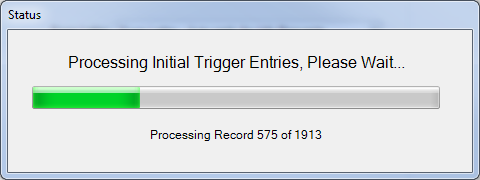
The software will set up the trigger for processing by filtering through your database and excluding records that may have fit the criteria in the past. This prepares the trigger for use going forward. Note: This initial processing DOES NOT actually create any communications or tasks. Triggers must be processed manually with the Process Triggers tool or automated with the Control Center.
-
Regularly process the trigger by going to Tools > Process Triggers.
For more information on using triggers throughout Spectra and Stratus Desktop, please see the What are Triggers? topic.